What is end-to-end testing? And how to automate it without code.
End-to-end testing runs a complete user journey through your real app in a real browser, the way a customer would, and checks the result at the end. To automate it without code, describe each journey in a sentence, run it once in Testorim, save the run you trust, and replay it from CI or on a schedule.
Join the waitlistWhere end-to-end tests fit.
Each layer of testing answers a different question. End-to-end tests are the only ones that answer “can a customer actually do this?”
| Layer | What it checks | What it cannot tell you |
|---|---|---|
| Unit tests | One function or component on its own, in milliseconds. | Whether the pieces work together once deployed. |
| Integration tests | Two or more parts together, such as an API and its database. | What a person actually sees and clicks in the browser. |
| End-to-end tests | A whole journey through the real app in a real browser, from the first page to the result. | Speed and precision: they are slower, and a failure says what broke for the user, not which line. |
Five steps to automated end-to-end tests.
- 1.
Pick the journeys, not the features
An end-to-end test follows a person from start to finish: sign up and reach the dashboard, or search, open a result and add it to the cart. Start with the three journeys that would cost you most if they broke.
- 2.
Write each journey as it would be told
One sentence per journey, ending with what should be true. Use a fresh value where the app needs one, such as {{random.email}} for a new account, so the test can run again tomorrow.
- 3.
Run it in a real browser and read the verdict
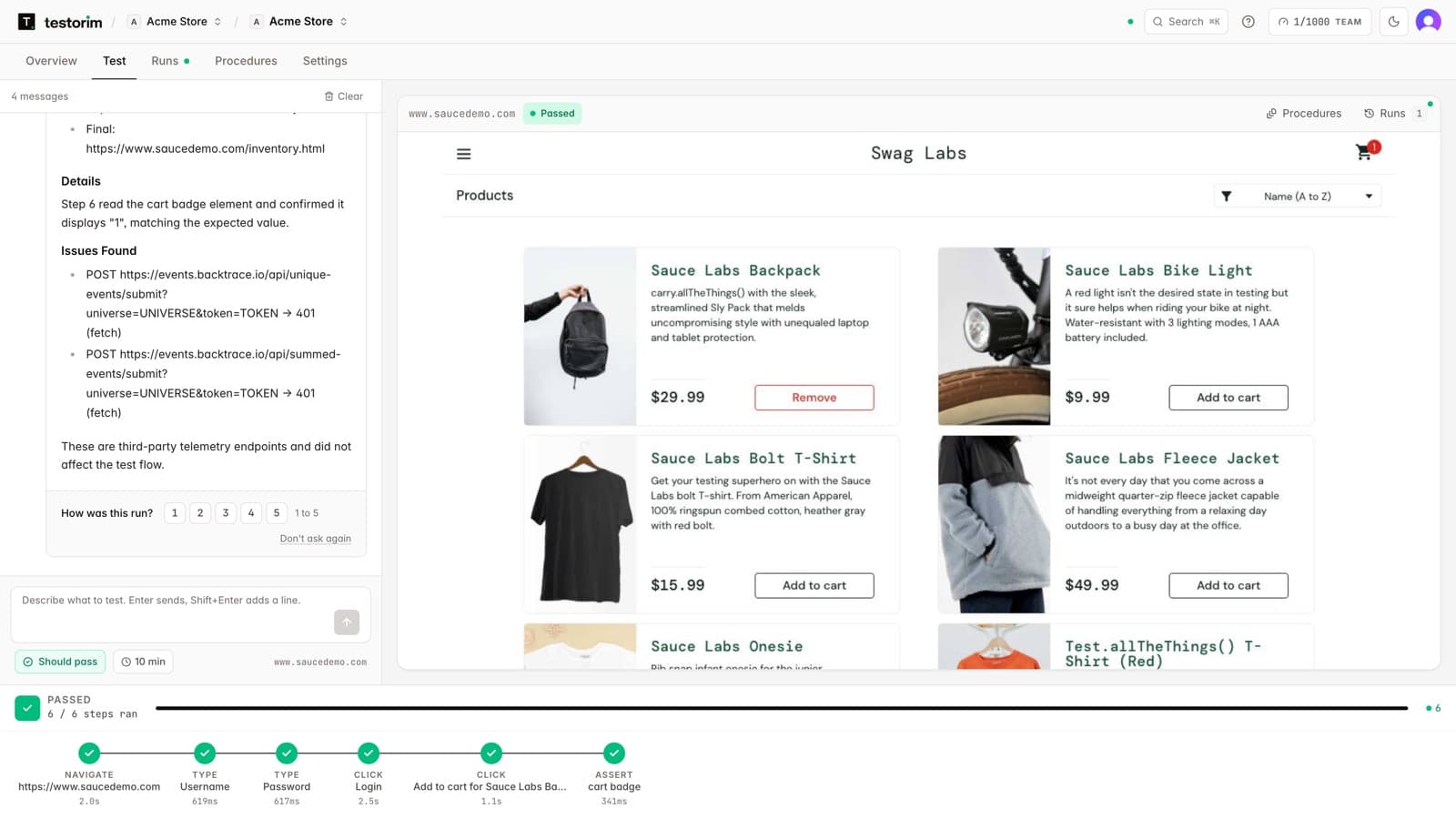
Testorim plans the steps and runs them in Chromium across every page of the journey, then marks each step passed or failed.
- 4.
Save the run you trust
The saved test keeps its steps and replays them the same way each time, without planning them again.
- 5.
Run it where releases happen
From CI after each deploy, on a schedule, or against a pull request's preview link, with failures sent to Slack or email.
Why end-to-end tests go flaky, and what Testorim does about it.
A flaky test passes one run and fails the next with nothing changed. Most of it comes from five causes.
Acting before the page is ready
After each action the run waits for the page to settle, including requests still in flight, before the next step.
Selectors that break on a redesign
Elements are found by role, label, placeholder and visible text on every run, with AI-assisted resolution recorded with the run when those do not match.
Tests leaking state into each other
A test that starts by opening its own page gets a fresh browser, so one test's sign-in or cart does not decide the next one's result.
Noise that is not the app's fault
Failed third-party requests are listed in the report without failing the test, and a result that cannot be confirmed is marked needs review instead of passed.
A red run nobody can explain
Every run keeps a video, screenshots, a Playwright trace and a report that says whether the app or the test was at fault.
An end-to-end testing example: from sign-up to first project.
Illustrative example, not a customer story. The app, its pages and its wording are invented.
The request
“Sign up with {{random.email}} and a password, finish onboarding with the company name Acme, create a project called Launch, and check the dashboard lists Launch.”
The steps Testorim plans
- 1navigateOpen /signup
- 2typeEmail field: a new address from {{random.email}}
- 3typePassword field: masked in the report
- 4clickCreate account button
- 5typeCompany name field: Acme
- 6clickContinue button
- 7clickNew project button
- 8typeProject name field: Launch
- 9clickCreate button
- 10assertThe project list contains “Launch”
When it passes, the report says
Passed. 10 of 10 steps passed across four pages: sign-up, onboarding, the new-project form and the dashboard, which listed Launch. The next run signs up with a different address, so it can run every day.
When it fails, the report says
Failed at step 10. The project was created and the page said so, but the dashboard's list did not include Launch until a reload. Every earlier step passed, so this points to the app: the dashboard did not refresh after creating a project.
A third result, needs review, means no step failed but something could not be confirmed, so a person should look before trusting it.
Quick answers
What is end-to-end testing?
Testing a complete user journey through the real application, in a real browser, from the first page to the final result. It checks that the front end, back end and everything between them work together the way a user experiences them.
What is the difference between end-to-end and integration testing?
Integration tests check that a few parts of the system work together, usually below the interface, such as a service and its database. End-to-end tests drive the finished app through the browser like a user, so they catch problems that only show up when every part is running together.
How many end-to-end tests should I have?
Few, and focused on the journeys that matter most. They are slower than unit tests, so keep the bulk of your checks at the lower layers and use end-to-end tests for sign-up, sign-in, the main flow and payment.
Can end-to-end tests check the database too?
Yes. A Testorim project can connect a database so a test can check that the journey wrote what it should, for example that a new sign-up created its row.
Can end-to-end tests run in CI?
Yes. A saved Testorim test runs from CI with the testorim CLI or the REST API, and the exit code tells the pipeline whether it passed, failed or needs review.
Limits: Testorim tests web apps at addresses the internet can reach. It does not mock network responses, and scheduled runs cannot type a code sent by email or SMS.